近期文章:如何设置 Telegram 用户名 username及其作用详解
问题描述
最近几个月Telegram代开会员,有些朋友反馈,他被私聊限制了,无法给我发送消息,也有时会遇到双向限制,其实这种情况可以向官方bot申请,也可以创建专属私聊bot,彻底解决这个问题,向官方 bot申诉之前有写过详细申诉教程,点击下方内容查看即可,这里就不赘述了,这篇文章目的是:如何零成本创建属于自己的telegram私聊Bot
Telegram创建属于自己的私聊 Bot,下面是详细步骤:
首先申请Bot API Token
1、向官方 @BotFather 申请一个机器人,获得 Bot API Token,,下面两种方法都要用到这个 API Token.
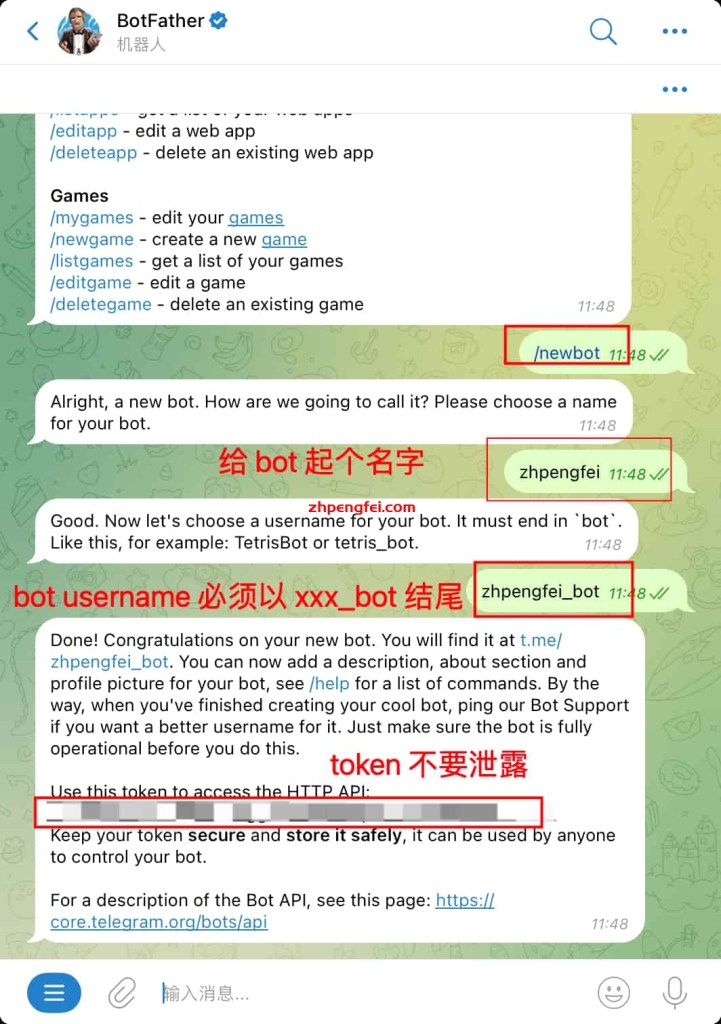
注意,截图中HTTP API就是 token,不要泄露给任何人
2、发送/setjoingroups来禁止此Bot被他人添加到群组,发送/setjoingroups后选择你的 bot,再发送 Disable即可。

创建好了 bot,也有 api token,接下来分别采用下面两种方式创建专属私聊 bot
方案一、使用 @LivegramBot ,创建专属私聊 bot
1、私聊 @LivegramBot,发送”/addbot”或点击 “Add Bot”,
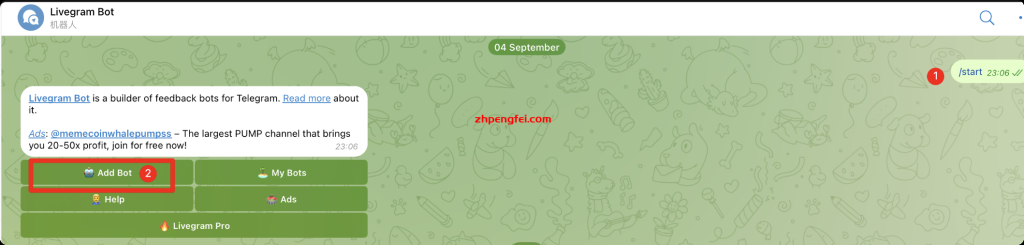
2、输入申请的 Bot API Token 即可。

LivegramBot缺点如下
- 1、是有广告,必须要购买才能去除
- 2、从技术上讲,使用该方法制作的私聊机器人,聊天内容可以被 @LivegramBot 所有者查看或储存,不保证私聊内容的安全性和隐私性。建议使用下面方案,更安全
方案二、 基于cloudflare worker 零成本实现telegram私聊机器人
好处是:
- 基于cloudflare worker搭建,能够实现以下效果
- 零成本,一个js文件即可完成搭建
- 不需要额外的域名,利用worker自带域名即可
- 基于worker kv实现永久数据储存,数据更加安全
- 稳定,全球cdn转发
搭建方法:
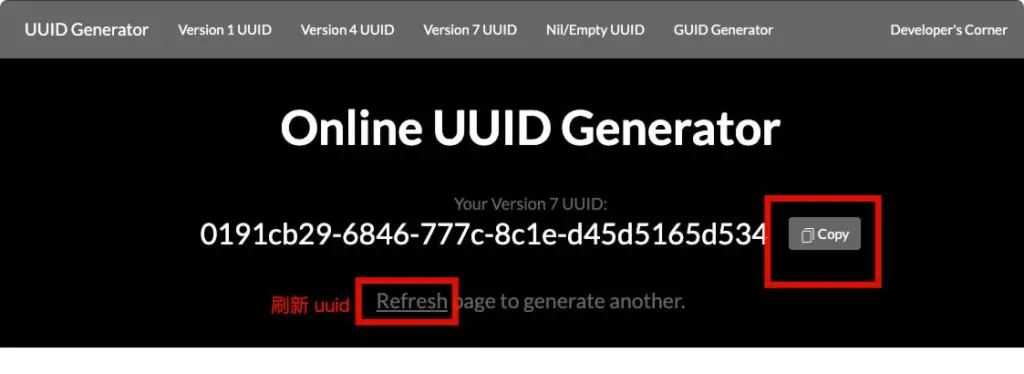
步骤1、从uuidgenerator获取一个随机uuid作为secret
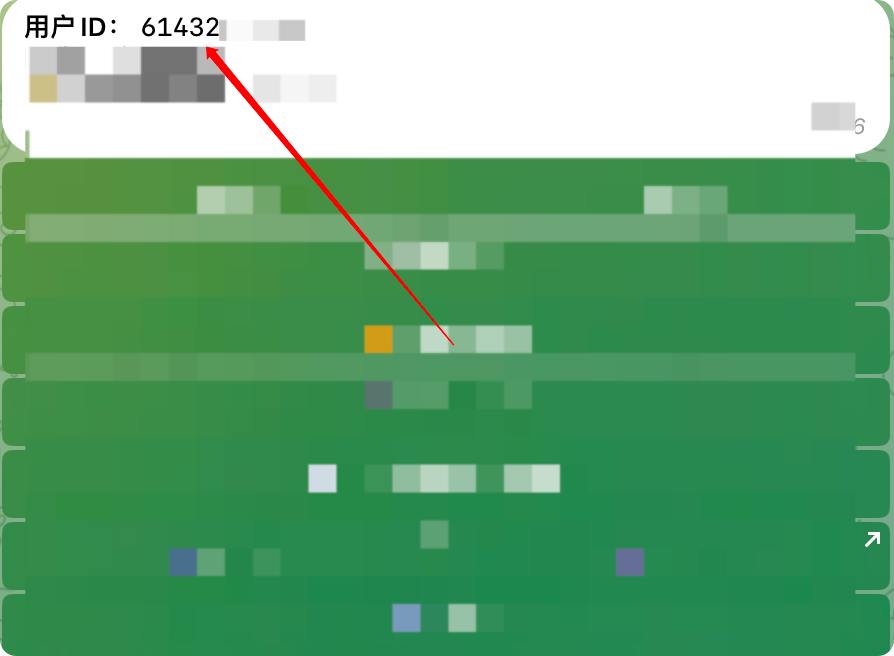
步骤2、从@sosoo获取你的用户id
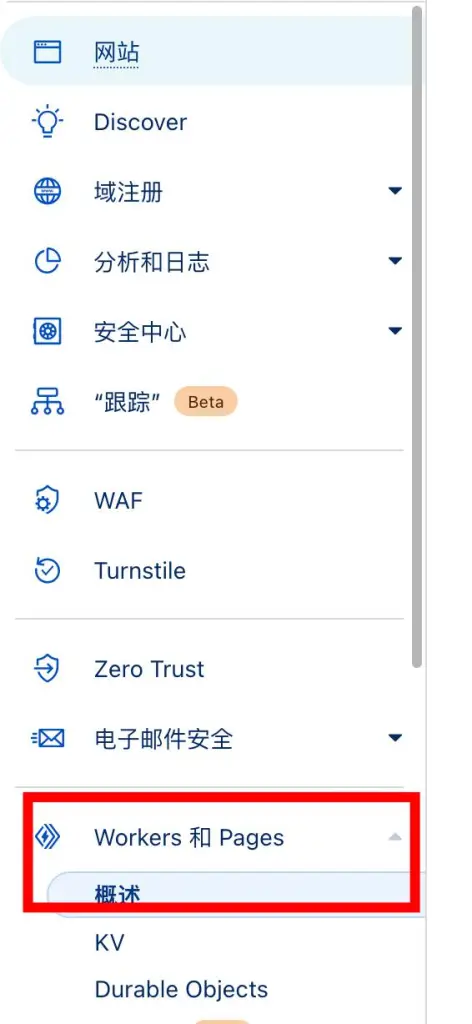
步骤3、登录cloudflare,左侧菜单点击 Workers和 Pages,创建一个worker
步骤4、创建 -》 创建 Worker -》输入名称 telegrambot


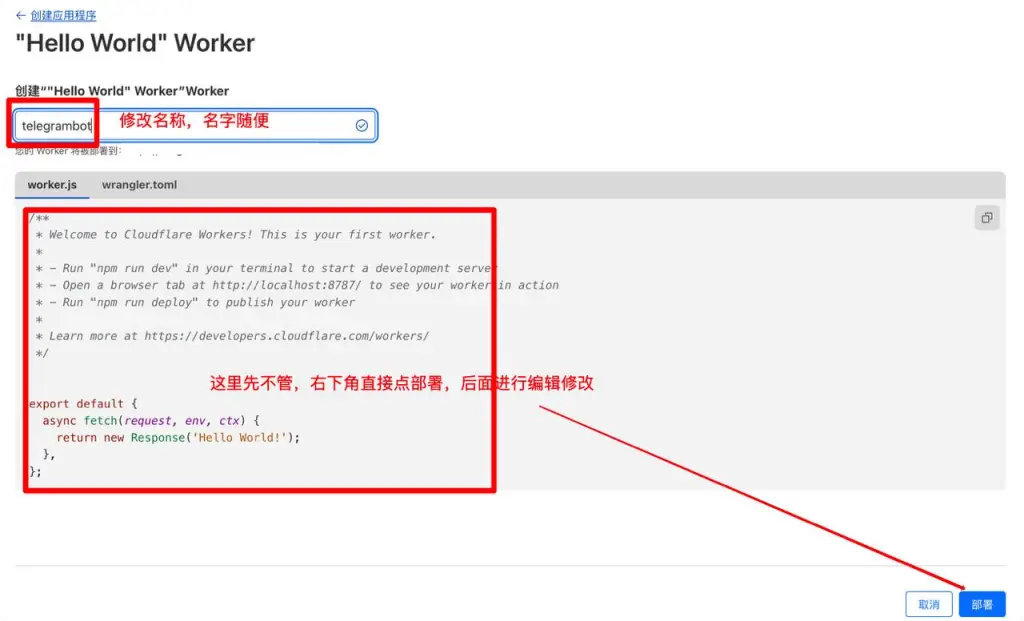
部署之后,点击右上角【继续处理项目】

步骤5、配置worker的变量,在设置-》变量-》添加变量
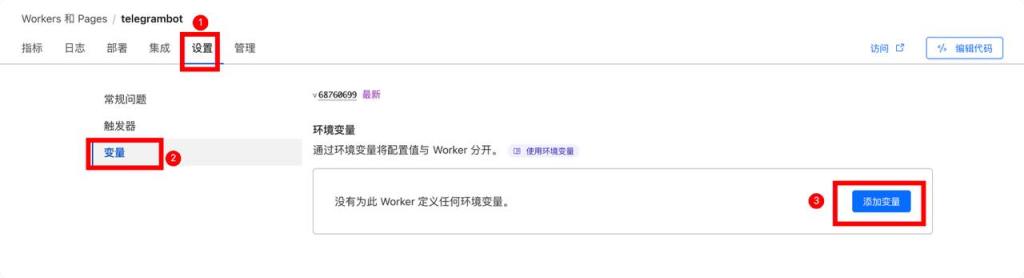
- 增加一个
ENV_BOT_TOKEN变量,值为向官方 bot申请的Bot API Token - 增加一个
ENV_BOT_SECRET变量,数值为从步骤1中获得的secret - 增加一个
ENV_ADMIN_UID变量,数值为从步骤2中获得的用户id

步骤6、创建一个命名空间为telegrambot的KV数据库

步骤7、绑定KV数据库,在设置 -> 变量,下滑找到KV 命名空间绑定:telegrambot -> telegrambot

步骤8、编辑代码

将worker下面代码全部复制
const TOKEN = ENV_BOT_TOKEN;
const WEBHOOK = '/endpoint';
const SECRET = ENV_BOT_SECRET;
const ADMIN_UID = ENV_ADMIN_UID;
const KV_NAMESPACE = telegrambot;
const LAST_USER_KEY = 'last_user';
const USER_MESSAGES_KEY_PREFIX = 'user_message_';
const ADMIN_RESPONSES_KEY_PREFIX = 'admin_response_';

addEventListener('fetch', event => {
  const url = new URL(event.request.url);
  if (url.pathname === WEBHOOK) {
    event.respondWith(handleWebhook(event));
  } else if (url.pathname === '/registerWebhook') {
    event.respondWith(registerWebhook(event, url, WEBHOOK, SECRET));
  } else if (url.pathname === '/unRegisterWebhook') {
    event.respondWith(unRegisterWebhook(event));
  } else {
    event.respondWith(new Response('No handler for this request'));
  }
});

async function handleWebhook(event) {
  if (event.request.headers.get('X-Telegram-Bot-Api-Secret-Token') !== SECRET) {
    return new Response('Unauthorized', { status: 403 });
  }

  const update = await event.request.json();
  event.waitUntil(onUpdate(update));

  return new Response('Ok');
}

async function onUpdate(update) {
  if ('message' in update) {
    await onMessage(update.message);
  }
}

async function onMessage(message) {
  const chatId = message.chat.id;
  const userName = message.from.username ? `@${message.from.username}` : message.from.first_name;

  if (chatId == ADMIN_UID) {
    // 处理管理员消息
    let userChatId;

    if (message.reply_to_message) {
      const repliedMessageId = message.reply_to_message.message_id;
      userChatId = await KV_NAMESPACE.get(`admin_message_${repliedMessageId}`);
      if (!userChatId) {
        await sendPlainText(ADMIN_UID, '无法找到要回复的用户消息。');
        return;
      }
    } else {
      // 获取最后一个活跃的用户
      userChatId = await KV_NAMESPACE.get(LAST_USER_KEY);
      if (!userChatId) {
        await sendPlainText(ADMIN_UID, '没有最近活跃的用户会话。');
        return;
      }
    }

    // 根据管理员发送的消息类型,转发给对应的用户
    let responseText = '';
    if (message.photo) {
      const photo = message.photo[message.photo.length - 1];
      await sendPhoto(userChatId, photo.file_id);
      responseText = `管理员发送了一张图片: ${photo.file_id}`;
    } else if (message.sticker) {
      await sendSticker(userChatId, message.sticker.file_id);
      responseText = `管理员发送了一张贴纸: ${message.sticker.file_id}`;
    } else if (message.voice) {
      await sendVoice(userChatId, message.voice.file_id);
      responseText = `管理员发送了一条语音消息: ${message.voice.file_id}`;
    } else if (message.document) {
      await sendDocument(userChatId, message.document.file_id);
      responseText = `管理员发送了一份文件: ${message.document.file_id}`;
    } else if (message.video) {
      await sendVideo(userChatId, message.video.file_id);
      responseText = `管理员发送了一段视频: ${message.video.file_id}`;
    } else if (message.location) {
      await sendLocation(userChatId, message.location.latitude, message.location.longitude);
      responseText = `管理员发送了一个位置: 纬度 ${message.location.latitude}, 经度 ${message.location.longitude}`;
    } else {
      const text = message.text || '收到一个非文本消息';
      await sendPlainText(userChatId, text);
      responseText = text;
    }
    await KV_NAMESPACE.put(`${ADMIN_RESPONSES_KEY_PREFIX}${userChatId}`, responseText);
  } else {
    // 处理用户消息
    let userMessageText = '';
    let response;
    if (message.photo) {
      const photo = message.photo[message.photo.length - 1];
      userMessageText = `用户发送了一张图片: ${photo.file_id}`;
      response = await sendPhoto(ADMIN_UID, photo.file_id, `来自用户 ${userName} 的图片`);
    } else if (message.sticker) {
      userMessageText = `用户发送了一张贴纸: ${message.sticker.file_id}`;
      response = await sendSticker(ADMIN_UID, message.sticker.file_id);
    } else if (message.voice) {
      userMessageText = `用户发送了一条语音消息: ${message.voice.file_id}`;
      response = await sendVoice(ADMIN_UID, message.voice.file_id);
    } else if (message.document) {
      userMessageText = `用户发送了一份文件: ${message.document.file_id}`;
      response = await sendDocument(ADMIN_UID, message.document.file_id);
    } else if (message.video) {
      userMessageText = `用户发送了一段视频: ${message.video.file_id}`;
      response = await sendVideo(ADMIN_UID, message.video.file_id);
    } else if (message.location) {
      userMessageText = `用户发送了一个位置: 纬度 ${message.location.latitude}, 经度 ${message.location.longitude}`;
      response = await sendLocation(ADMIN_UID, message.location.latitude, message.location.longitude);
    } else {
      const text = message.text || '用户发送了非文本消息';
      userMessageText = text;
      response = await sendPlainText(ADMIN_UID, `来自用户 ${userName} 的消息:\n${text}`);
    }
    // 保存管理员消息ID与用户聊天ID的映射
    if (response && response.result && response.result.message_id) {
      const adminMessageId = response.result.message_id;
      await KV_NAMESPACE.put(`admin_message_${adminMessageId}`, chatId.toString());
    }
    await KV_NAMESPACE.put(`${USER_MESSAGES_KEY_PREFIX}${chatId}`, userMessageText);
    // 更新最后一个活跃的用户
    await KV_NAMESPACE.put(LAST_USER_KEY, chatId.toString());
  }
}

function apiUrl(methodName) {
  return `https://api.telegram.org/bot${TOKEN}/${methodName}`;
}

async function sendPlainText(chatId, text) {
  const response = await fetch(apiUrl('sendMessage'), {
    method: 'POST',
    headers: { 'Content-Type': 'application/json' },
    body: JSON.stringify({ chat_id: chatId, text })
  });
  return response.json();
}

async function sendSticker(chatId, fileId) {
  const response = await fetch(apiUrl('sendSticker'), {
    method: 'POST',
    headers: { 'Content-Type': 'application/json' },
    body: JSON.stringify({ chat_id: chatId, sticker: fileId })
  });
  return response.json();
}

async function sendPhoto(chatId, fileId, caption = '') {
  const response = await fetch(apiUrl('sendPhoto'), {
    method: 'POST',
    headers: { 'Content-Type': 'application/json' },
    body: JSON.stringify({ chat_id: chatId, photo: fileId, caption })
  });
  return response.json();
}

async function sendVoice(chatId, fileId) {
  const response = await fetch(apiUrl('sendVoice'), {
    method: 'POST',
    headers: { 'Content-Type': 'application/json' },
    body: JSON.stringify({ chat_id: chatId, voice: fileId })
  });
  return response.json();
}

async function sendDocument(chatId, fileId) {
  const response = await fetch(apiUrl('sendDocument'), {
    method: 'POST',
    headers: { 'Content-Type': 'application/json' },
    body: JSON.stringify({ chat_id: chatId, document: fileId })
  });
  return response.json();
}

async function sendVideo(chatId, fileId) {
  const response = await fetch(apiUrl('sendVideo'), {
    method: 'POST',
    headers: { 'Content-Type': 'application/json' },
    body: JSON.stringify({ chat_id: chatId, video: fileId })
  });
  return response.json();
}

async function sendLocation(chatId, latitude, longitude) {
  const response = await fetch(apiUrl('sendLocation'), {
    method: 'POST',
    headers: { 'Content-Type': 'application/json' },
    body: JSON.stringify({ chat_id: chatId, latitude, longitude })
  });
  return response.json();
}

async function registerWebhook(event, requestUrl, suffix, secret) {
  const webhookUrl = `${requestUrl.protocol}//${requestUrl.hostname}${suffix}`;
  const response = await fetch(apiUrl('setWebhook'), {
    method: 'POST',
    headers: { 'Content-Type': 'application/json' },
    body: JSON.stringify({ url: webhookUrl, secret_token: secret })
  });
  const r = await response.json();
  return new Response('ok' in r && r.ok ? 'Ok' : JSON.stringify(r, null, 2));
}

async function unRegisterWebhook(event) {
  const response = await fetch(apiUrl('setWebhook'), {
    method: 'POST',
    headers: { 'Content-Type': 'application/json' },
    body: JSON.stringify({ url: '' })
  });
  const r = await response.json();
  return new Response('ok' in r && r.ok ? 'Ok' : JSON.stringify(r, null, 2));
}
步骤 9、替换掉默认代码后,右上角点击部署,然后顶部中间点击 worker.dev进行访问

10、完成bot部署
url后面加上/registerWebhook,进行 webhook注册 (unRegisterWebhoo 取消注册)
备注:如果打不开url就需要翻墙,因为在中国大陆cloudflare worker.dev域名被禁了,也可以给 worker绑定一个域名解决

显示 OK就完成部署了,接下来测试一下私聊bot
测试私聊bot
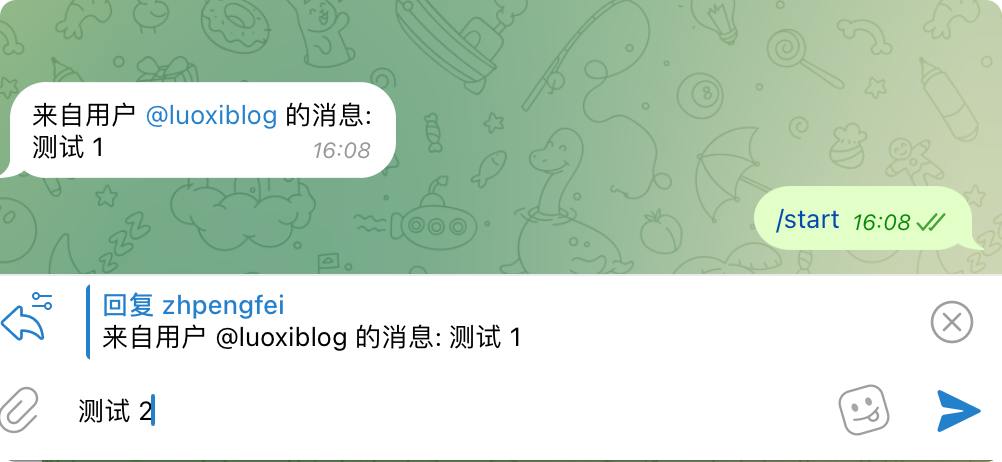

经过我反复多人测试,已实现文本、图片、贴纸、视频,语音,文件消息都可以发送成功,无延迟。
特点:
- 消息都会保存在 kv库中,安全
- 多人同时发送消息给 bot时,多人发送消息,轻点消息选择回复用户即可
- 多人同时发送消息给 bot时,最后一条消息为当前会话,可以直接回复
大家有什么建议或发现什么bug,可以在群组里讨论👥 Telegram 中文社群